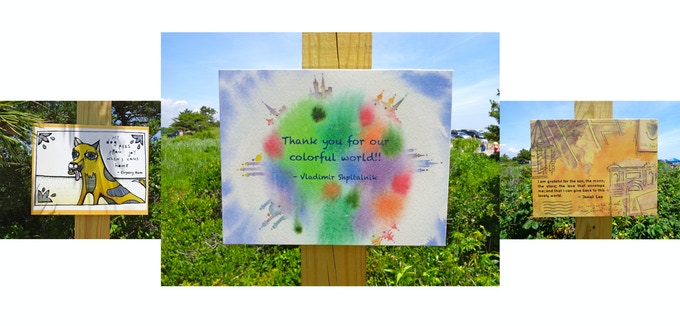
Create a postcard size (or larger) work of art that illustrates what you are GRATEFUL for.
What are you grateful for? Make a list.
How do you want to illustrate (represent in a drawing, painting, digital art (using Google Drawing)
Create your art on any size piece of paper or digital format. Take your time planning the composition (arrangement of elements of paper), choosing a color scheme, thinking about how to make it a stunning work of art. Invest at some time into your art.
Photograph your art (remember you learned how to photograph your work and turn it in Google Classroom) I cannot wait to see them!
If you can go outside and breathe in the fresh air!
Anne Kubitsky is and artist/founder of "Looking for the Good". Follow this link to learn more about her. Postcards have been displayed all over the place, there are some pictures from Hammonasset Beach in Madison.
She helps people remember that there is always something to be grateful for not only in the good times but also in times that are more challenging.
Below is a postcard I sent in...the one that says, "I am grateful for HOPE". I did the background in watercolor and added gold and bronze marker.
This one incorporates photographs...
I love that this one is a combination of writing and watercolor. The color scheme is lovely!
You may recognize the image below from seeing it in the Drawing classroom at school. Shepard Fairey uses art to relay a message and to provoke discussion.
There are several videos you can watch in the 8th Grade column, but for the assignment you should watch the one below and answer the questions regarding Shepard Fairey on the Google Classroom assignment page. Turn in your answers by Monday 5/11.
We will be having a GOOGLE MEET on Monday May 11, at 10:00 to discuss Shepard Fairey's artwork. The classroom discussion will be based on the completed questions.
In 7th grade we study how perspective and realistic lighting is needed to create Surrealism. In the digital work of art below you can see just that!
Click on the image and start putting the pieces together. After you complete the puzzle take a screenshot of your score and keep the photograph in your drawing folder!