Designing for the Web
As we begin designing our home page for our website we need to understand what makes the home or index page successful. The home page is the first page a viewer sees so it needs to function properly and be appealing. We will view several websites in class and discuss what elements are making it work or not. You will then find two websites that you will critique. One should be an example of a poorly designed site and the other a successful one. Use the, "Elements of a Successful Website" document as you critique the websites. View the "Website Critique" document for your complete assignment.
Monday, November 24, 2014
Flash Final Reflection
You should be very familiar with Flash after completing your final movie. Complete the Flash reflection and assessment in your journal after we watch all the movies created by the class.
Wednesday, November 19, 2014
EXPLORE AND DISCOVER
What
can you discover about ceramics when you explore new ideas and concepts?
This project will require you to try something
new on a small scale. Your project will
be no bigger than 10 inches or as small as you like. If you are in Advanced Ceramics you have
taken this course for over a semester so at this point you have tried most “traditional”
methods of construction and glazing. There
is SO MUCH more out there! So search the
internet, especially sites like Pinterest to find something that you think
would be interesting to try.
You will be required to:
- · Try a new method of construction or glazing
- · Create a sketch of what you are doing labeled with the Elements and Principles of Design you are exploring
- · Demonstrate the technique used to the class
- · Complete a self-reflection at the end of construction and glazing
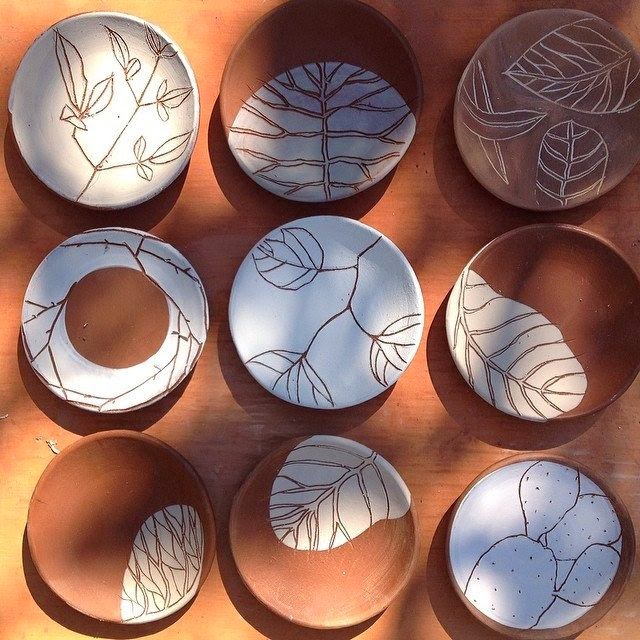
All of these ceramic pieces have something unique
about the glazes. Have you ever added
glass to a glaze? How would you do
that? What kinds of glass can you fire
in the kiln? What about adding multiple
layers of texture and glazes? Have you
ever used slip to add a different color then drawn a design taking away the
slip?
Friday, November 14, 2014
Using the Bone Tool in Flash
Designing for the Web
We are going to "Flip the Classroom" for this project. Searching for information about a topic on the Internet can seem simple, just type in what you need and you get the answers. Not always. Sometimes I spend ten minutes watching or reading a tutorial and realize that I am wasting my time. So what makes a tutorial found on the web worthwhile? YOU tell me at the end of this lesson, be prepared to share the process with the class.
In this lesson you will be required to:
- Create a short animation that utilizes the bone tool. This can be a brief showcase of the bone tool.
- Find useful resources on the web that will teach you how to make an animation utilizing the bone tool.
If you choose you may work with a partner. Start your search for information on animations created using the bone tool. Answer the following questions in a new journal entry.
- What websites were the most helpful to you and who were they published by?
- Which sites weren't so helpful to you and who were they published by?
- Were there any sites that were blocked from you that you think could have been useful?
- Were you able to access any videos of someone creating an animation using the bone tool?
- Once you found the information what complications did you have creating the animation?
- Did you utilize Photoshop when creating this animation?
- How did you and your partner work together? What portions of the work did you do?
- What would you like to add to or change about your animation?
Wednesday, November 5, 2014
Flash Final
Designing for the Web
Make your final Flash project a personal work of art that reflects your style and interests. Your final project in Flash should include:
Below are two examples of ways to approach this project (they are works in progress..).
Make your final Flash project a personal work of art that reflects your style and interests. Your final project in Flash should include:
- shape, classic, motion, and/or motion presets
- sound
- ActionScript (play/pause button)
- a point of view and a clear theme
- 30 seconds or longer
Tuesday, November 4, 2014
Multiple Tile Reflection
Take some time to reflect on the process you went through to create your tiles and the final result. It is always good to learn from your work.
Adding "Action Script" to your Slide-Show
Designing for the Web
The movie below is a final flash project created by a student from a previous semester. In a few weeks you have been introduced to the very basics of what Flash can do. We have only scratched the service of what Flash is capable of. ActionScript was added to the file below. Action Script is a type of code added into keyframes to add action to the movie. For instance the action makes the movie start when you press the word "play". Go ahead and press play and see what happens.In your final flash project you will use the same script to start your own movies.
Subscribe to:
Posts (Atom)