Showing posts with label
Layering Text & Shapes in Photoshop Due 9/11.
Show all posts
Showing posts with label
Layering Text & Shapes in Photoshop Due 9/11.
Show all posts
Designing for the Web
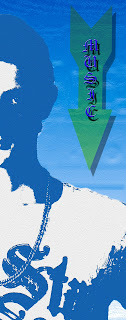 |
| Designed by Tim O. |
In this lesson you will add a variety of shapes and text to your creative self portraits. Pay attention to the negative space in your work to find a place where you can add these elements without making your artwork look crowded. We are trying to create depth and interest in our piece by learning how to use the f/x and shape tools. You will also be required to teach yourself how to make a custom shape using the Shape Tool Tutorial below and "text on a path" by searching for tutorials on the internet.
Make sure your piece includes:
- Atleast 4 shapes that are transparent and unique (one custom shape)
- A variety of fonts with f/x
- An example of Warping text
- An example of Text on a path


.jpg)