Tuesday, May 7, 2013

Perspective and Perception

Intro to Drawing and Painting

Your next artistic challenge will be to create an acrylic painting that shows your knowledge of perspective. Create the illusion of space by portraying objects and architecture the correct size and proportion.  Choose an architectural or atmospheric space that is intriguing to you and then make a painting that represents that space in your personal way.  You may simplify the details to create an abstract painting or you can try for a realistic rendering. 

View the following Document for more information on this lesson:


The paintings below make an impact by including perspective as a key component to design. 


SKY LAND IMAGINATION

Advanced Drawing and Painting
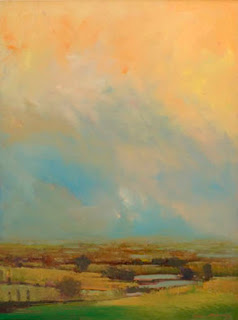


"Each of these luminous and mysterious images of trees against sky, field, and river evoke a subtle variation of light and atmosphere. The arrangement of the trees - whether standing in solitude or in pairs or in large groupings seem at once inevitable and yet surprising, formal yet accidental. All of these paintings are comprised from memory, imagination and thumbnail sketches from my beautiful basement studio in my home in Connecticut. I work on wood board, paper and canvas using several layers of gesso before priming the surface with cadmium red base, a quick sketch using charcoal is used to lay out the design then the paint is applied. I work in layers using thinned down oil color, building on these layers with glazing techniques the colors are adjusted and brought up to completion before final coats of varnish are applied. Light has come to play an important part, and when I look back over this body of work, I feel it speaks about spiritual places, places that contain a quiet inner light, radiating an ethereal whisper, the places we see every day."
- William McCarthy


Your next assignment is to create an acrylic landscape that experiments with the layering of color to create a luminous atmosphere.   William McCarthy and many artist take photographs and draw thumbnails sketches of landscapes that have an appealing composition or beautiful lighting.  They then go back to the studio and create a landscape that may or may not be representational.  Some artists would prefer only to paint outside looking at the natural world and how the sun affects it, there are many ways to create a landscape or seascape. 
For this project focus on:
  • ·         Creating a composition that has atleast 60 percent sky so the horizon line falls below the center of your piece.  This will allow you to focus on creating an interesting sky and you can layer colors in larger areas.

  • ·         Choose a color scheme that includes tints with accents of other more intense colors.

  • ·         Search for a landscape or seascape that inspires you, but that you aren’t “copying”.  You can use a photograph you or someone you know took.   You wont be duplicating them, but observing the colors, shapes, texture of the sky.  You can also combine images from a variety of photographs to create the one you like.  

  • ·         Abstract if you like.  This painting could be a very abstract one with barely any details if you choose, but you need to have a beginning reference.  


Monday, May 6, 2013

Flash Final Project

Designing for the Web

Make your final Flash project a personal work of art that reflects your style and interests. Your final project in Flash should include:
  • shape, classic, motion, and/or motion presets
  • sound
  • ActionScript (play button)
  • a point of view and a clear theme
Below are two examples of ways to approach this project (they are works in progress...hopefully they will be finished soon).


Friday, May 3, 2013

Adding Action Script

Designing for the Web

The movie below is a final flash project created by a student from a previous semester.  In a few weeks you have been introduced to the very basics of what Flash can do.  We have only scratched the service of what Flash is capable of.  ActionScript was added to the file below.  Action Script is a type of code added into keyframes to add action to the movie.  For instance the action makes the movie start when you press the word "play".  Go ahead and press play and see what happens.In your final flash project you will use the same script to start your own movies.  


Tuesday, April 30, 2013

Pinch Pot Journal Entry

Ceramics


Complete the following journal entry when you have finished glazing all of your pinch pots. 


Surrealism Journal Entry

Designing for the Web

Complete the  Surrealism Reflection Journal Entry by May 3rd. 


Monday, April 29, 2013

Creating a Slide-Show in Flash

Designing for the Web

Now that you know how to  create Shape, Motion, and Classic Tweens it is time to learn how to create a slide show in Flash.  The images below are fading in and out by adjusting the "alpha" in the color effect area of the properties panel.  

Begin by inserting your image to a layer (File-import image to stage), convert it to symbol-choosing movie clip for your option.  Then insert a key-frame 10 frames down the timeline. Insert another keyframe on Frame 25.   On frame 25 make the alpha  0.  After doing this create a Classic Tween between  frame 10 and 25.   On a new layer insert a key-frame where the first picture begins to fade out (frame 10).  Import a new image. Convert to symbol. On this frame the alpha will be 0.  Insert a keyframe 15 frames down the timeline (frame 25).  At this frame the alpha will be 100.  Create a classic tween. Insert a keyframe 10 Frames down the timeline (frame 35).  Insert another keyframe 15 frames down the timeline.  At this frame the alpha will be 0.  Create a classic tween between (frames 35-50).  Repeat this process by inserting a key frame where the previous picture begins to fade out. 


The final part of the slide show is fading the very first picture of the slide in where the last picture is fading out.  This should create a smooth transition from beginning to end.  

When creating a slide show you can speed up or slow down the transitions by putting fewer or greater frames in between the key-frames.  There are many ways to make slide-shows, this is only one way to get you started.
Now create one of your own and place in the "Flash Intro" folder as an .swf when finished. Save as "lastnameslideshow"

Wednesday, April 24, 2013

Calliope Submission


An  Intro to Drawing student submitted this beautiful drawing for our school literary magazine, Calliope.  Wonderful value changes and contrast create a drawing that has depth and interest. Great work Emma!


Emma N